Approving and managing eForm entities
After Requesting eForm entities, follow the steps below to approve and manage them.
To manage eForm entities:
- Follow Accessing your instances to log in to the PKIaaS user interface using an account with the Owners role.
-
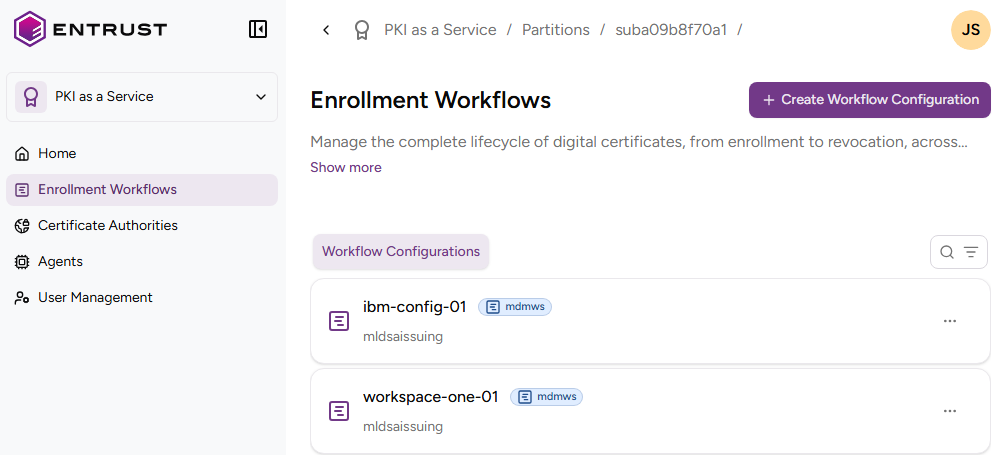
Click Enrollment Workflows in the sidebar.
-
Select an eForm workflow configuration.
-
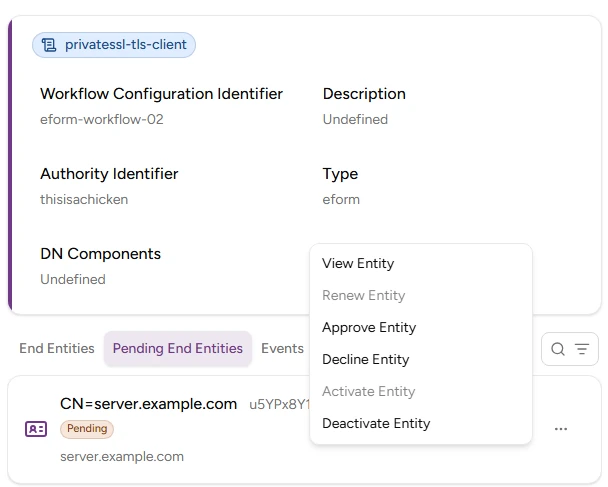
On the workflow details page, select the Pending Entities tab.
-
Select the three dots (…) to the right of the entity and select:
- Renew Entity to renew the last issued certificate of the entity.
- Approve Entity to approve the entity and issue the first TLS certificate.
- Decline Entity to decline an entity and the corresponding TLS certificate request.
- Activate Entity to activate a deactivated entity.
- Deactivate Entity to deactivate an entity. Inactive entities do not support certificate renewal.