Browsing CAs
Follow the steps below to browse and inspect the details of all certificate authorities (CAs) in your PKI.
To browse certificate authorities:
- Follow Accessing your instances to log in to the PKIaaS user interface as a user with any of the roles described under Role permissions.
-
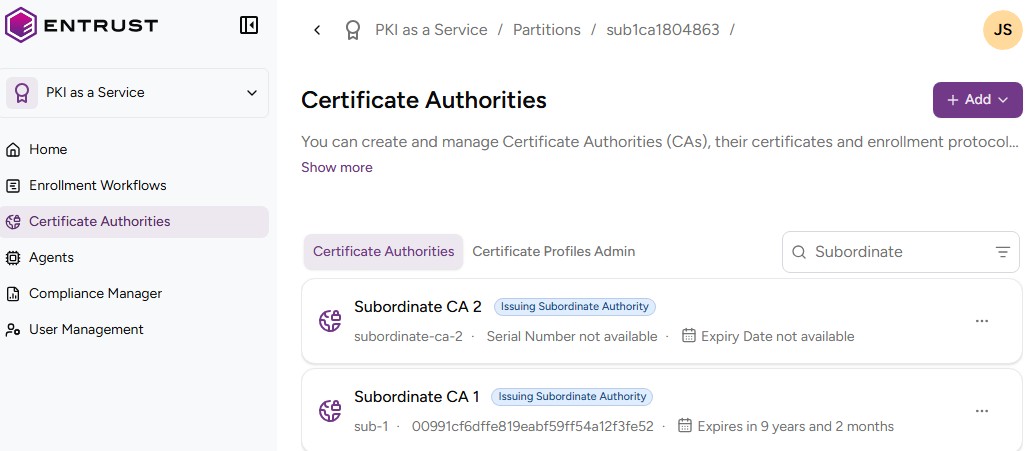
Click Certificate Authorities in the sidebar.
-
Select the Certificate Authorities tab to display the list of certificate authorities.
- Optionally, narrow the list with the options described in Querying data.
-
Select a certificate authority to check the following values.
Subject
The Subject’s Distinguished Name (DN) of the Certificate authority certificate.
Type
The certificate authority type. See Definitions for a description of each type.
CA Identifier
The identifier assigned to the certificate authority on creation.
URLs
The CA Gateway endpoint for the certificate authority.
Serial Number
The serial number (SN) of the CA certificate.
SHA-256 Fingerprint
The SHA-256 fingerprint of the CA certificate.
Issuer
The Distinguished Name of the entity that issued the CA certificate.
Valid From
The time and date when the CA certificate became valid.
Expiry Date
The time and date when the CA certificate will expire.
Public Key Type
The public key algorithm of the CA certificate.
Signature Algorithm
The signature algorithm of the CA certificate.
Basic Constraints
The basic constraints for the CA certificate (see RFC 5280 for details on basic constraints).
Key Usage
The key usages for the CA certificate.
Authority Info Access OCSP
The URL of the OCSP responder service providing the CA certificate status.
Authority Info Access CA Issuers
The locations that provide access to the issuer certificate.
Authority Key Identifier
The key identifier of the entity that issued the CA certificate.
Subject Key Identifier
The key identifier for the certificate subject.
CRL Distribution Points
The URLs from which to download the CRLs (Certificate Revocation Lists) providing the CA certificate status.