Adding an allowed SANs list
Follow the steps below to add a list of allowed Subject Alternative Names (SANs).
To create an allowed SANs list:
Follow Accessing your instances to log in to the PKIaaS user interface using an account with one of the following roles:
Click Certificate Authorities in the sidebar and select the Allowed SANs tab.
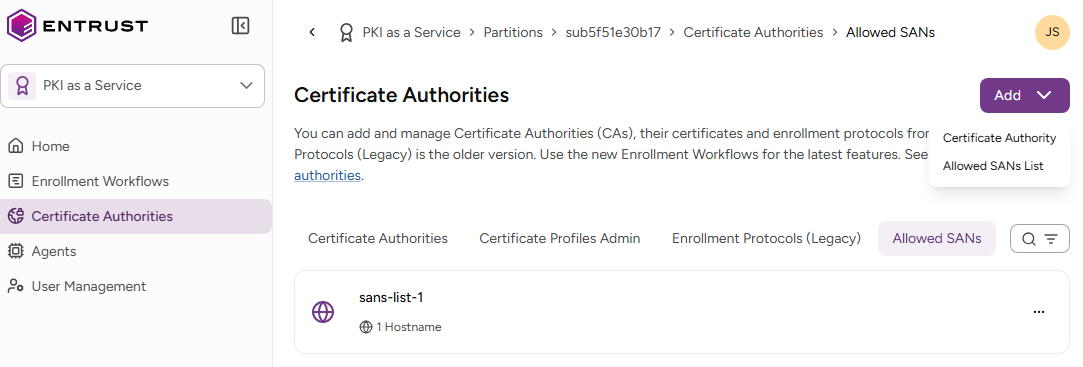
- Select Add > Allowed SANs list.
- Configure the following list settings.
- Click Add.
Allowed SANs List
The unique identifier of the new list.
Hostnames
The list of allowed DNS hostnames. For each DNS name pattern, select the corresponding Permitted Scope. See the table below for examples.
| DNS name | Permitted Scope | Matched domains |
|---|---|---|
| example.com, *.example.com | Domains or subdomains | example.com |
| www.example.com | ||
| api.example.com | ||
| sub.api.example.com | ||
| *.example.com | Subdomains only | www.example.com |
| api.example.com | ||
| sub.api.example.com | ||
| example.com | Exact match | example.com |
Networks
The allowed IPv4 and IPv6 network ranges, in CIDR (Classless Inter-Domain Routing) notation.
<IP address>/<prefix length>
See below for sample values.
| Network | Allowed IPs |
|---|---|
| 192.168.1.0/24 | IPs from 192.168.1.0 to 192.168.1.255 |
| 10.0.0.5/32 | A single IP address |
| 2001:db8::/32 | An IPv6 network |