Creating an issuing subordinate authority
An issuing subordinate Certificate Authority (CA):
-
Operates under the authority of either a root CA or an intermediate subordinate CA.
-
Issues digital certificates to end entities like servers, devices, or users.
See below for how to create an issuing subordinate CA.
To create an issuing subordinate CA:
-
Follow the steps described in Accessing your partitions to log into the PKIaaS interface as a user with any of these roles:
-
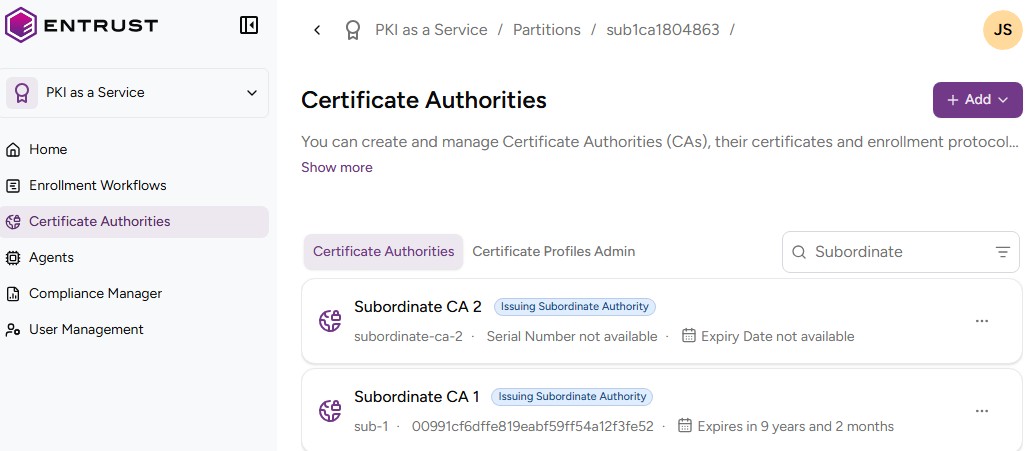
Click Certificate Authorities in the sidebar.
-
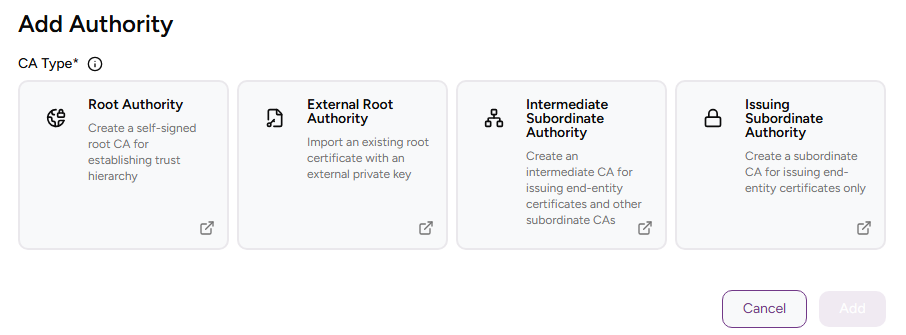
Click Add and select Certificate Authority.
-
Select Issuing subordinate Authority.
-
Complete the following values.
-
Click Add.
-
Check the details of the created CA — for example, the Serial Number of the Certificate Signing Certificate.
CA Identifier
Enter a unique identifier for the new CA in your PKI hierarchy. This identifier:
- Must contain 2-18 characters
- Can only include lowercase letters, numbers, hyphens (’-’), and underscores (’_')
ℹ After deleting a CA, wait 24 hours before creating a CA with the same identifier.
Friendly Name
Write a descriptive name for the CA in your PKIaaS partition.
Parent Authority Identifier
Select the parent authority for the new subordinate authority. The parent authority can be of the following types.
| CA type | Description | Additional steps |
|---|---|---|
| Root | Creating a root authority | – |
| External Root | Importing an external root authority | Certifying a CA with an external root CA |
| Intermediate | Creating an intermediate subordinate authority | – |
Signing Key Details
Select a combination of cryptosystem and hash algorithm for the new CA to sign certificates.
ℹ The production release does not yet support some of the combinations listed below.
See the table below for the supported Classic keys.
| Label | Key algorithm | Signature algorithm | VA key type | VA signature algorithm |
|---|---|---|---|---|
| ECDSAP256+SHA256 | ECDSAP256 | ecdsa-with-SHA256 | RSA2048 | sha256WithRSAEncryption |
| ECDSAP384+SHA384 | ECDSAP384 | ecdsa-with-SHA384 | RSA2048 | sha256WithRSAEncryption |
| ECDSAP521+SHA512 | ECDSAP521 | ecdsa-with-SHA512 | RSA2048 | sha256WithRSAEncryption |
| RSA-2048+PKCS15-SHA256 | RSA2048 | sha256WithRSAEncryption | RSA2048 | sha256WithRSAEncryption |
| RSA-2048+PSS-SHA256 | RSA2048 | sha256WithRSAPSS | RSA2048 | sha256WithRSAPSS |
| RSA-3072+PKCS15-SHA256 | RSA3072 | sha256WithRSAEncryption | RSA2048 | sha256WithRSAEncryption |
| RSA-3072+PSS-SHA256 | RSA3072 | sha256WithRSAPSS | RSA2048 | sha256WithRSAPSS |
| RSA-4096+PKCS15-SHA512 | RSA4096 | sha512WithRSAEncryption | RSA2048 | sha256WithRSAEncryption |
| RSA-4096+PSS-SHA512 | RSA4096 | sha512WithRSAPSS | RSA2048 | sha256WithRSAPSS |
See the table below for the supported Post-Quantum (PQ) keys.
| Label | Key algorithm | Signature algorithm | VA key type | VA signature algorithm |
|---|---|---|---|---|
| Hash-SLH-DSA-SHA2-128f-With-SHA256 | Hash-SLH-DSA-SHA2-128f-With-SHA256 | Hash-SLH-DSA-SHA2-128f-With-SHA256 | RSA2048 | sha256WithRSAEncryption |
| Hash-SLH-DSA-SHA2-128s-With-SHA256 | Hash-SLH-DSA-SHA2-128s-With-SHA256 | Hash-SLH-DSA-SHA2-128s-With-SHA256 | RSA2048 | sha256WithRSAEncryption |
| Hash-SLH-DSA-SHA2-192f-With-SHA512 | Hash-SLH-DSA-SHA2-192f-With-SHA512 | Hash-SLH-DSA-SHA2-192f-With-SHA512 | RSA2048 | sha256WithRSAEncryption |
| Hash-SLH-DSA-SHA2-192s-With-SHA512 | Hash-SLH-DSA-SHA2-192s-With-SHA512 | Hash-SLH-DSA-SHA2-192s-With-SHA512 | RSA2048 | sha256WithRSAEncryption |
| Hash-SLH-DSA-SHA2-256f-With-SHA512 | Hash-SLH-DSA-SHA2-256f-With-SHA512 | Hash-SLH-DSA-SHA2-256f-With-SHA512 | RSA2048 | sha256WithRSAEncryption |
| Hash-SLH-DSA-SHA2-256s-With-SHA512 | Hash-SLH-DSA-SHA2-256s-With-SHA512 | Hash-SLH-DSA-SHA2-256s-With-SHA512 | RSA2048 | sha256WithRSAEncryption |
| Hash-SLH-DSA-SHAKE-128f-With-SHAKE128 | Hash-SLH-DSA-SHAKE-128f-With-SHAKE128 | Hash-SLH-DSA-SHAKE-128f-With-SHAKE128 | RSA2048 | sha256WithRSAEncryption |
| Hash-SLH-DSA-SHAKE-128s-With-SHAKE128 | Hash-SLH-DSA-SHAKE-128s-With-SHAKE128 | Hash-SLH-DSA-SHAKE-128s-With-SHAKE128 | RSA2048 | sha256WithRSAEncryption |
| Hash-SLH-DSA-SHAKE-192f-With-SHAKE256 | Hash-SLH-DSA-SHAKE-192f-With-SHAKE256 | Hash-SLH-DSA-SHAKE-192f-With-SHAKE256 | RSA2048 | sha256WithRSAEncryption |
| Hash-SLH-DSA-SHAKE-192s-With-SHAKE256 | Hash-SLH-DSA-SHAKE-192s-With-SHAKE256 | Hash-SLH-DSA-SHAKE-192s-With-SHAKE256 | RSA2048 | sha256WithRSAEncryption |
| Hash-SLH-DSA-SHAKE-256f-With-SHAKE256 | Hash-SLH-DSA-SHAKE-256f-With-SHAKE256 | Hash-SLH-DSA-SHAKE-256f-With-SHAKE256 | RSA2048 | sha256WithRSAEncryption |
| Hash-SLH-DSA-SHAKE-256s-With-SHAKE256 | Hash-SLH-DSA-SHAKE-256s-With-SHAKE256 | Hash-SLH-DSA-SHAKE-256s-With-SHAKE256 | RSA2048 | sha256WithRSAEncryption |
| ML-DSA-44 | ML-DSA-44 | ML-DSA-44 | RSA2048 | sha256WithRSAEncryption |
| ML-DSA-65 | ML-DSA-65 | ML-DSA-65 | RSA2048 | sha256WithRSAEncryption |
| ML-DSA-87 | ML-DSA-87 | ML-DSA-87 | RSA2048 | sha256WithRSAEncryption |
See the table below for the supported Composite keys.
| Label | Key algorithm | Signature algorithm | VA key type | VA signature algorithm |
|---|---|---|---|---|
| MLDSA44-ECDSA-P256-SHA256 | MLDSA44-ECDSA-P256-SHA256 | MLDSA44-ECDSA-P256-SHA256 | RSA2048 | sha256WithRSAEncryption |
| MLDSA44-RSA2048-PKCS15-SHA256 | MLDSA44-RSA2048-PKCS15-SHA256 | MLDSA44-RSA2048-PKCS15-SHA256 | RSA2048 | sha256WithRSAEncryption |
| MLDSA44-RSA2048-PSS-SHA256 | MLDSA44-RSA2048-PSS-SHA256 | MLDSA44-RSA2048-PSS-SHA256 | RSA2048 | sha256WithRSAPSS |
| MLDSA65-ECDSA-P256-SHA512 | MLDSA65-ECDSA-P256-SHA512 | MLDSA65-ECDSA-P256-SHA512 | RSA2048 | sha256WithRSAEncryption |
| MLDSA65-ECDSA-P384-SHA512 | MLDSA65-ECDSA-P384-SHA512 | MLDSA65-ECDSA-P384-SHA512 | RSA2048 | sha256WithRSAEncryption |
| MLDSA65-RSA3072-PKCS15-SHA512 | MLDSA65-RSA3072-PKCS15-SHA512 | MLDSA65-RSA3072-PKCS15-SHA512 | RSA2048 | sha256WithRSAEncryption |
| MLDSA65-RSA3072-PSS-SHA512 | MLDSA65-RSA3072-PSS-SHA512 | MLDSA65-RSA3072-PSS-SHA512 | RSA2048 | sha256WithRSAPSS |
| MLDSA65-RSA4096-PKCS15-SHA512 | MLDSA65-RSA4096-PKCS15-SHA512 | MLDSA65-RSA4096-PKCS15-SHA512 | RSA2048 | sha256WithRSAEncryption |
| MLDSA65-RSA4096-PSS-SHA512 | MLDSA65-RSA4096-PSS-SHA512 | MLDSA65-RSA4096-PSS-SHA512 | RSA2048 | sha256WithRSAPSS |
| MLDSA87-ECDSA-P384-SHA512 | MLDSA87-ECDSA-P384-SHA512 | MLDSA87-ECDSA-P384-SHA512 | RSA2048 | sha256WithRSAEncryption |
| MLDSA87-ECDSA-P521-SHA512 | MLDSA87-ECDSA-P521-SHA512 | MLDSA87-ECDSA-P521-SHA512 | RSA2048 | sha256WithRSAEncryption |
| MLDSA87-RSA3072-PSS-SHA512 | MLDSA87-RSA3072-PSS-SHA512 | MLDSA87-RSA3072-PSS-SHA512 | RSA2048 | sha256WithRSAPSS |
| MLDSA87-RSA4096-PSS-SHA512 | MLDSA87-RSA4096-PSS-SHA512 | MLDSA87-RSA4096-PSS-SHA512 | RSA2048 | sha256WithRSAPSS |
Expiry Date
Select an expiry date for the Certificate Signing Certificate of the new CA.
⚠ After the expiry date, the CA cannot operate if you have not renewed the CA certificate.
Allowed SAN List
Select the list of Subject Alternative Names (SANs) that can be included in the certificates issued by the authority. If no list is selected, all SANs will be allowed.
ℹ See Managing SAN lists for how to create and manage allowed SAN lists.
Enable CRL
This read-only box is always checked as PKIaaS authorities always provide a CRL publishing endpoint.
Enable OCSP
Check this box to enable an OCSP (Online Certificate Status Protocol) service for the new certificate authority.
ℹ This feature requires a subscription that includes the OCSP Service. See Checking your subscriptions for how to check your current subscription.
Certificate Profiles
Select the Subscriber certificate profiles the new issuing subordinate CA will support for issuing certificates to end-entities.
- Click + to expand the profiles on the selected groups.
- Select the check boxes of the profiles you want to enable.
ℹ See Customizing subscriber profiles for how to create custom profiles.
Subject
Enter a value for each RFC5280 attribute in the certificate subject’s Distinguished Name (DN).
| Field | Mandatory |
|---|---|
| Common Name | ✔ |
| Organization | ❌ |
| Organizational Unit | ❌ |
| State/Province | ❌ |
| Locality Name | ❌ |
| Domain Component | ❌ |
| Country | ❌ |
Alternatively, you can:
- Toggle the Advanced Subject switch.
- Type a Distinguished Name (DN) including additional attributes.
The resulting Distinguished Name will uniquely identify the Certificate Signing Certificate of your new CA — for example:
CN=MyRootCA, O=MyOrganization, L=MyCity, ST=MyState, C=US