Modifying an allowed SANs list
Follow the steps below to update an allowed SANs list.
To update an allowed SANs list:
Follow Accessing your instances to log in to the PKIaaS user interface using an account with one of the following roles:
Click Certificate Authorities in the sidebar and select the Allowed SANs tab.
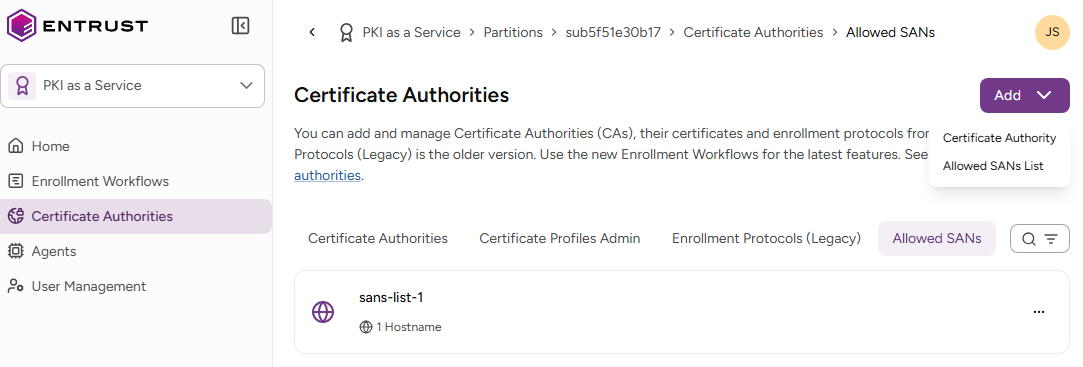
- Select the three dots (…) to the right of a list and select Modify Allowed SANs Lists.
- Update the following list settings.
- Click Modify.
Hostnames
The list of allowed DNS hostnames. For each DNS name pattern, select the corresponding Permitted Scope. See the table below for examples.
| DNS name | Permitted Scope | Matched domains |
|---|---|---|
| example.com, *.example.com | Domains or subdomains | example.com |
| www.example.com | ||
| api.example.com | ||
| sub.api.example.com | ||
| *.example.com | Subdomains only | www.example.com |
| api.example.com | ||
| sub.api.example.com | ||
| example.com | Exact match | example.com |
Networks
The allowed IPv4 and IPv6 network ranges, in CIDR (Classless Inter-Domain Routing) notation.
<IP address>/<prefix length>
See below for sample values.
| Network | Allowed IPs |
|---|---|
| 192.168.1.0/24 | IPs from 192.168.1.0 to 192.168.1.255 |
| 10.0.0.5/32 | A single IP address |
| 2001:db8::/32 | An IPv6 network |