Creating an EC2 instance
Create an EC2 instance for running the agent virtual machine image.
To create the EC2 instance:
-
Type “EC2” in the AWS console search box.
-
Select EC2 in the search results to display the EC2 dashboard.
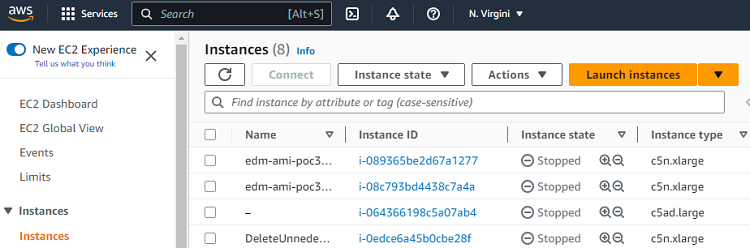
-
Select Instances > Instances in the navigation sidebar.
-
Click Launch instance in the options menu.
-
Configure the following settings.
-
Click Launch instance.
Name and tags > Name
Enter a name for the new EC2 instance.
Application and OS Images (Amazon Machine Image)
Under the My AMIs tab, select the image previously imported in Importing the AMI.
Instance type
Select an EC2 instance built on the AWS Nitro System:
https://docs.aws.amazon.com/ec2/latest/instancetypes/ec2-nitro-instances.html
Key pair (login)
Select Proceed without a key pair because the SSH connection won’t be used.
Network settings > Firewall (security groups)
Select or create a security group with permission to open the ports described in Agent network requirements.
Configure storage
Select the default volume size.