Running logical filters
See below for how to define, combine and run logical filters on data.
- Running a logical filter
- Combining logical filters
- Adding nested groups of logical filters
- Copying logical filters
Running a logical filter
See below for how to filter objects using logical conditions on any attribute.
To run a logical filter:
-
Click the filter icon
 in the upper-right corner.
 -
Under Suggestions, select a field on which to run a logical condition.
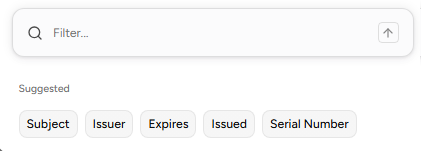
-
Under Operator, select a logical condition.
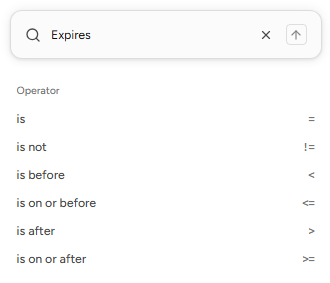
-
Type the value to query against the field using the selected condition. If the value is time-based, such as an expiry date, the dialog displays a list of predefined values.
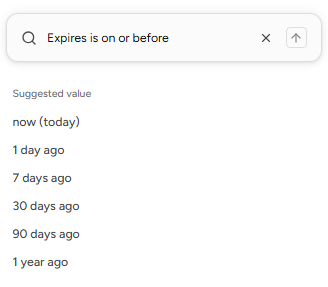
-
Click the
 icon to run the filter.
Combining logical filters
See below for combining several logical filters.
To combine several logical filters:
-
Create a filter as explained in Running a logical filter, and press Enter instead of
when completing the filter. -
Create a new filter and press Enter.
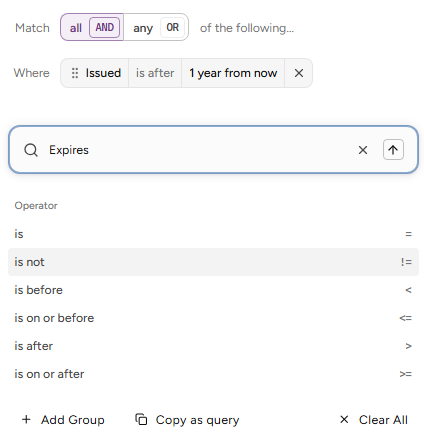
-
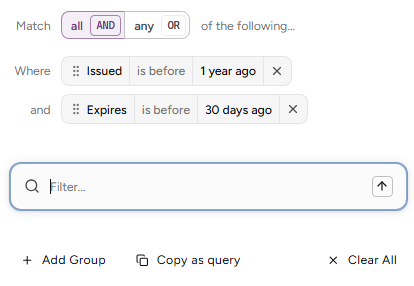
In the Match row, select the AND or OR logical condition to combine filters.
-
Repeat the steps to add the required filters.
-
Click the
icon to run the filter.
Adding nested groups of logical filters
See below for creating nested groups of logical filters.
To add a group of logical filters:
-
Create at least one filter as explained in Running a logical filter (press Enter instead of
when completing the filter).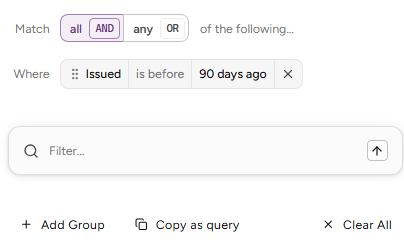
-
Click Add Group.
-
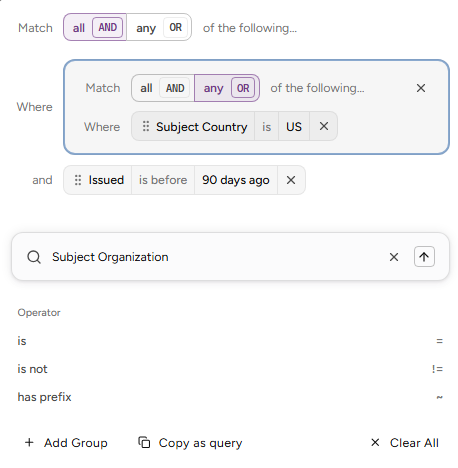
Enter new filter conditions and type Enter to add them to the new group.
-
In the Match row of the group, select the AND or OR logical condition to combine the group filters.
Copying logical filters
When completing a logical filter, click Copy as query to copy the defined filter in a text format you can later paste in the filter box.
For example:
notbefore < now - 1y AND notafter < now - 30d