Issuing certificates from a CSR
Follow the steps below to process a PKCS #10 Certificate Signing Request (CSR) for a locally generated key pair.
To issue a certificate from a CSR:
-
Generate a key pair and a CSR on your local machine using your preferred tools.
-
Follow Accessing your instances to log in to the PKIaaS user interface using an account with one of the following roles:
-
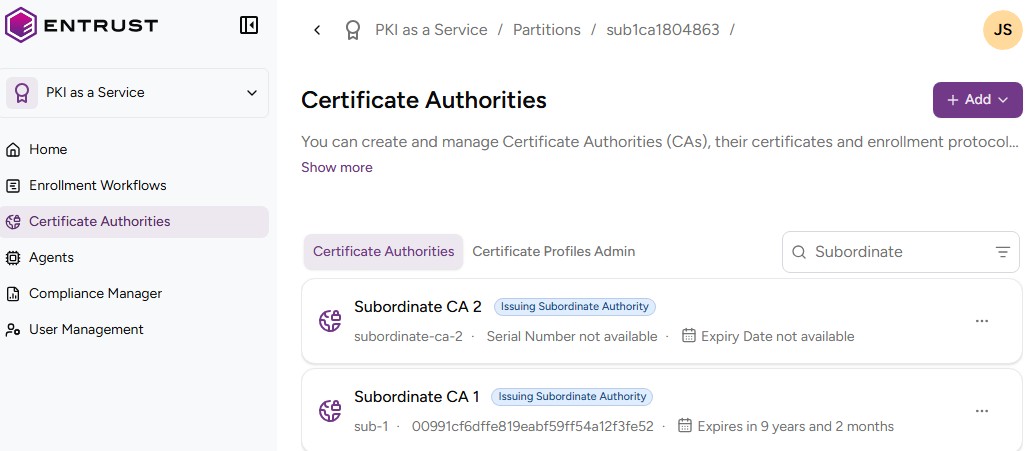
Click Certificate Authorities in the sidebar.
-
In the Certificate Authorities tab, select the three dots (…) to the right of the certificate authority that will issue the certificate.
-
Select Issue Certificate.
-
Click Certificate with Client-side Generated CSR (X.509 cert).
-
Complete the following values.
Certificate profile
Select one of the Subscriber certificate profiles for the certificate authority to issue this certificate.
Certificate Signing Request
Paste the encoded text of a Certificate Signing Request (CSR) you have locally generated for a key pair.
Sectigo note
When issuing from a third-party Sectigo authority, the request form can include additional metadata-driven fields (for example CA configuration fields and custom fields) based on the selected authority configuration.
Use Subject from CSR
Check this box if you want the issued certificate to use the same subject Distinguished Name (DN) as the CSR pasted in the Certificate Signing Request field.
Subject
Enter a value for each RFC 5280 attribute in the certificate subject’s Distinguished Name (DN).
| Field | Mandatory |
|---|---|
| Common Name | ✔ |
| Organization | ❌ |
| Organizational Unit | ❌ |
| State/Province | ❌ |
| Locality Name | ❌ |
| Domain Component | ❌ |
| Country | ❌ |
Alternatively, you can:
- Toggle the Advanced Subject switch.
- Type a Distinguished Name (DN) that includes additional attributes.
For example, when the certificate subject represents a corporate employee:
CN=John Doe, OU=Sales, O=Example Corp, L=San Francisco, ST=California, C=US
When the certificate subject represents a corporate domain:
CN=server1.example.com, OU=IT, O=Example Corp, L=Chicago, ST=Illinois, C=US
Subject Alternative Names
Add optional Subject Alternative Names (SANs) for the certificate subject. Typically, SANs extend the domain names or IP addresses set in the Subject field of a TLS certificate. For example:
| SAN type | SAN example value |
|---|---|
| DNS Name | example.com |
| DNS Name | www.example.com |
| DNS Name | example.net |
| DNS Name | mail.example.com |
| DNS Name | support.example.com |
| DNS Name | example2.com |
| IPv4 Address | 93.184.216.34 |
| IPv6 Address | 2606:2800:220:1:248:1893:25c8:1946 |
Custom Fields
Enter values for the optional fields described in Managing custom fields.