Entrust PKI as a Service

Creating an issuing subordinate CA

An issuing subordinate Certificate Authority (CA):

  • Operates under the authority of either a root CA or an intermediate subordinate CA.

  • Issues digital certificates to end entities like servers, devices, or users.

See below for how to create an issuing subordinate CA.

To create an issuing subordinate CA:

  1. Follow the steps described in Accessing your partitions to log into the PKIaaS interface as a user with any of these roles:

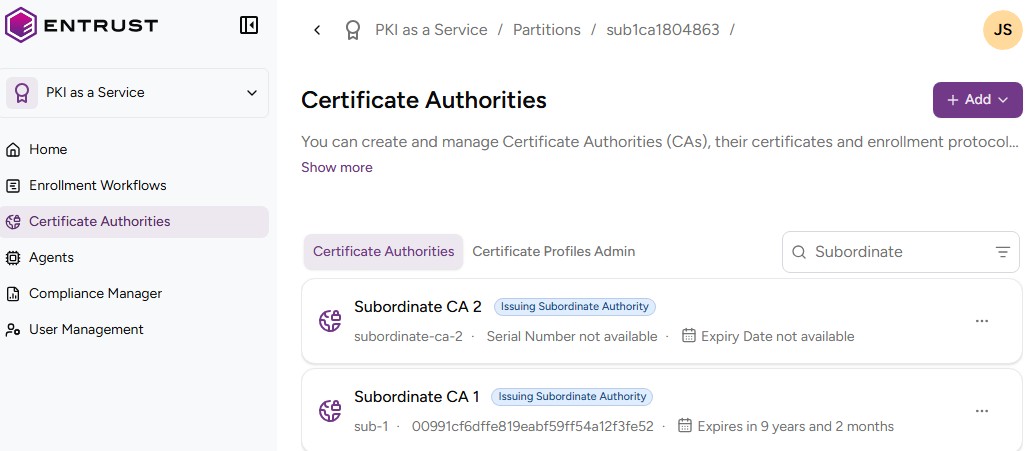
  2. Click Certificate Authorities in the sidebar.
    PNG

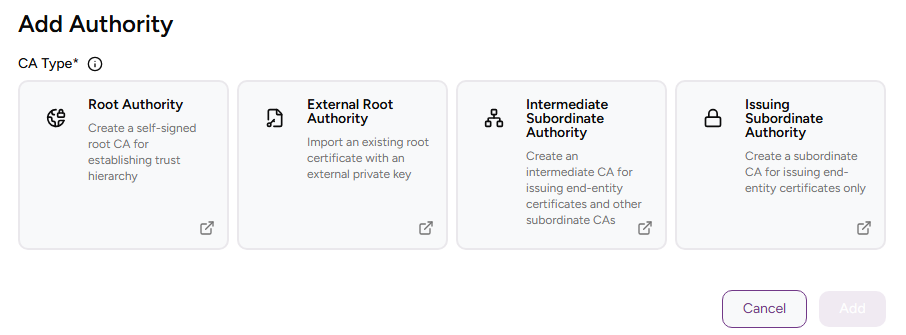
  3. In the content pane, select ACTIONS > Create Authority for a root or intermediate CA. Alternatively, you can click the top ADD button and select Subordinate Authority in the CA Type list.

    PNG

  4. Complete the following values.

  5. Click Create.

  6. Check the details of the created CA.

  7. If the Parent Authority Identifier corresponds to an external root CA, follow the steps in Certifying a CA with an external root CA.

CA Identifier

Write a unique identifier for the new CA in your PKI hierarchy. This identifier:

  • Must be 2-18 characters long
  • Can only include lowercase letters, numbers, hyphens (’-’), and underscores (’_')

ℹ After deleting a CA, wait 24 hours before creating a CA with the same identifier.


Friendly Name

Write a descriptive name for the CA in your PKIaaS partition.

Parent Authority Identifier

Select the root CA that will sign the Certificate Signing Certificate of the new subordinate CA.


ℹ This field is read-only if the root CA was selected at the start of the subordinate CA creation.


Signing Key Details

Select a combination of cryptosystem and hash algorithm for the new CA to sign certificates.


ℹ Some of the below combinations are not yet supported on the production release.


Label Key algorithm Signature algorithm VA key type VA signature algorithm
RSA-2048+PKCS15-SHA256 RSA2048 sha256WithRSAEncryption RSA2048 sha256WithRSAEncryption
RSA-2048+PSS-SHA256 RSA2048 sha256WithRSAPSS RSA2048 sha256WithRSAPSS
RSA-3072+PKCS15-SHA256 RSA3072 sha256WithRSAEncryption RSA2048 sha256WithRSAEncryption
RSA-3072+PSS-SHA256 RSA3072 sha256WithRSAPSS RSA2048 sha256WithRSAPSS
RSA-4096+PKCS15-SHA512 RSA4096 sha512WithRSAEncryption RSA2048 sha256WithRSAEncryption
RSA-4096+PSS-SHA512 RSA4096 sha512WithRSAPSS RSA2048 sha256WithRSAPSS
ECDSAP256+SHA256 ECDSAP256 ecdsa-with-SHA256 RSA2048 sha256WithRSAEncryption
ECDSAP384+SHA384 ECDSAP384 ecdsa-with-SHA384 RSA2048 sha256WithRSAEncryption
ECDSAP521+SHA512 ECDSAP521 ecdsa-with-SHA512 RSA2048 sha256WithRSAEncryption
ML-DSA-44 ML-DSA-44 ML-DSA-44 RSA2048 sha256WithRSAEncryption
ML-DSA-65 ML-DSA-65 ML-DSA-65 RSA2048 sha256WithRSAEncryption
ML-DSA-87 ML-DSA-87 ML-DSA-87 RSA2048 sha256WithRSAEncryption
Hash-SLH-DSA-SHA2-128s-With-SHA256 Hash-SLH-DSA-SHA2-128s-With-SHA256 Hash-SLH-DSA-SHA2-128s-With-SHA256 RSA2048 sha256WithRSAEncryption
Hash-SLH-DSA-SHA2-128f-With-SHA256 Hash-SLH-DSA-SHA2-128f-With-SHA256 Hash-SLH-DSA-SHA2-128f-With-SHA256 RSA2048 sha256WithRSAEncryption
Hash-SLH-DSA-SHA2-192s-With-SHA512 Hash-SLH-DSA-SHA2-192s-With-SHA512 Hash-SLH-DSA-SHA2-192s-With-SHA512 RSA2048 sha256WithRSAEncryption
Hash-SLH-DSA-SHA2-192f-With-SHA512 Hash-SLH-DSA-SHA2-192f-With-SHA512 Hash-SLH-DSA-SHA2-192f-With-SHA512 RSA2048 sha256WithRSAEncryption
Hash-SLH-DSA-SHA2-256s-With-SHA512 Hash-SLH-DSA-SHA2-256s-With-SHA512 Hash-SLH-DSA-SHA2-256s-With-SHA512 RSA2048 sha256WithRSAEncryption
Hash-SLH-DSA-SHA2-256f-With-SHA512 Hash-SLH-DSA-SHA2-256f-With-SHA512 Hash-SLH-DSA-SHA2-256f-With-SHA512 RSA2048 sha256WithRSAEncryption
Hash-SLH-DSA-SHAKE-128s-With-SHAKE128 Hash-SLH-DSA-SHAKE-128s-With-SHAKE128 Hash-SLH-DSA-SHAKE-128s-With-SHAKE128 RSA2048 sha256WithRSAEncryption
Hash-SLH-DSA-SHAKE-128f-With-SHAKE128 Hash-SLH-DSA-SHAKE-128f-With-SHAKE128 Hash-SLH-DSA-SHAKE-128f-With-SHAKE128 RSA2048 sha256WithRSAEncryption
Hash-SLH-DSA-SHAKE-192s-With-SHAKE256 Hash-SLH-DSA-SHAKE-192s-With-SHAKE256 Hash-SLH-DSA-SHAKE-192s-With-SHAKE256 RSA2048 sha256WithRSAEncryption
Hash-SLH-DSA-SHAKE-192f-With-SHAKE256 Hash-SLH-DSA-SHAKE-192f-With-SHAKE256 Hash-SLH-DSA-SHAKE-192f-With-SHAKE256 RSA2048 sha256WithRSAEncryption
Hash-SLH-DSA-SHAKE-256s-With-SHAKE256 Hash-SLH-DSA-SHAKE-256s-With-SHAKE256 Hash-SLH-DSA-SHAKE-256s-With-SHAKE256 RSA2048 sha256WithRSAEncryption
Hash-SLH-DSA-SHAKE-256f-With-SHAKE256 Hash-SLH-DSA-SHAKE-256f-With-SHAKE256 Hash-SLH-DSA-SHAKE-256f-With-SHAKE256 RSA2048 sha256WithRSAEncryption
SPHINCS+-SHA2-128f-simple SPHINCS+-SHA2-128f-simple SPHINCS+-SHA2-128f-simple RSA2048 sha256WithRSAEncryption
SPHINCS+-SHA2-128s-simple SPHINCS+-SHA2-128s-simple SPHINCS+-SHA2-128s-simple RSA2048 sha256WithRSAEncryption
SPHINCS+-SHA2-192f-simple SPHINCS+-SHA2-192f-simple SPHINCS+-SHA2-192f-simple RSA2048 sha256WithRSAEncryption
SPHINCS+-SHA2-192s-simple SPHINCS+-SHA2-192s-simple SPHINCS+-SHA2-192s-simple RSA2048 sha256WithRSAEncryption
SPHINCS+-SHA2-256f-simple SPHINCS+-SHA2-256f-simple SPHINCS+-SHA2-256f-simple RSA2048 sha256WithRSAEncryption
SPHINCS+-SHA2-256s-simple SPHINCS+-SHA2-256s-simple SPHINCS+-SHA2-256s-simple RSA2048 sha256WithRSAEncryption
Falcon-512 Falcon-512 Falcon-512 RSA2048 sha256WithRSAEncryption
Falcon-1024 Falcon-1024 Falcon-1024 RSA2048 sha256WithRSAEncryption
MLDSA44-RSA2048-PKCS15 MLDSA44-RSA2048-PKCS15 MLDSA44-RSA2048-PKCS15 RSA2048 sha256WithRSAEncryption
MLDSA44-RSA2048-PSS MLDSA44-RSA2048-PSS MLDSA44-RSA2048-PSS RSA2048 sha256WithRSAPSS
MLDSA44-ECDSA-P256 MLDSA44-ECDSA-P256 MLDSA44-ECDSA-P256 RSA2048 sha256WithRSAEncryption
MLDSA65-RSA3072-PKCS15 MLDSA65-RSA3072-PKCS15 MLDSA65-RSA3072-PKCS15 RSA2048 sha256WithRSAEncryption
MLDSA65-RSA3072-PSS MLDSA65-RSA3072-PSS MLDSA65-RSA3072-PSS RSA2048 sha256WithRSAPSS
MLDSA65-RSA4096-PKCS15 MLDSA65-RSA4096-PKCS15 MLDSA65-RSA4096-PKCS15 RSA2048 sha256WithRSAEncryption
MLDSA65-RSA4096-PSS MLDSA65-RSA4096-PSS MLDSA65-RSA4096-PSS RSA2048 sha256WithRSAPSS
MLDSA65-ECDSA-P384 MLDSA65-ECDSA-P384 MLDSA65-ECDSA-P384 RSA2048 sha256WithRSAEncryption
MLDSA87-ECDSA-P384 MLDSA87-ECDSA-P384 MLDSA87-ECDSA-P384 RSA2048 sha256WithRSAEncryption

Expiry Date

Select an expiration date for the Certificate Signing Certificate of the new CA.


⚠ After the expiration date, the CA becomes unusable unless the certificate has been renewed.


Enable CRL

Check this box to enable the generation of CRLs (Certificate Revocation Lists).


ℹ A Certificate Revocation List (CRL) is a list of digital certificates that the issuing Certificate Authority (CA) revoked before expiration.


Enable OCSP

Check this box to enable an OCSP (Online Certificate Status Protocol) service that checks the validity status of the certificates issued by this CA.


⚠ This option is only present when creating a subordinate CA and requires a valid OCSP license.


When creating a subordinate CA with OCSP enabled:

  • The CA issues a certificate to sign the OCSP responses.
  • The certificates issued by the CA include the URL of the OCSP service. See Browsing certificates for how to inspect this URL in the certificate details.
  • The OCSP service cannot be disabled.

Certificate Profiles

Select the profiles the new subordinate CA will support for issuing subscriber certificates.

To select the certificate profiles of a subordinate CA:

  1. Select one or more profile groups.

  2. Click + to expand the profiles on the selected groups.

  3. Mark the boxes of the profiles you want to enable.

Subject

Enter a value for each attribute of the certificate subject. The resulting Distinguished Name will uniquely identify the Certificate Signing Certificate of your new CA — for example:

CN=MyRootCA, O=MyOrganization, L=MyCity, ST=MyState, C=US

ℹ Only the Common Name subject attribute is mandatory.