Certifying a CA with an external root CA
After creating an intermediate or issuing subordinate CA, follow the steps below if a root external CA operates as parent CA.
To certify a CA with an external root CA:
-
Follow the steps described in Accessing your partitions to log into the PKIaaS interface as a user with any of these roles:
-
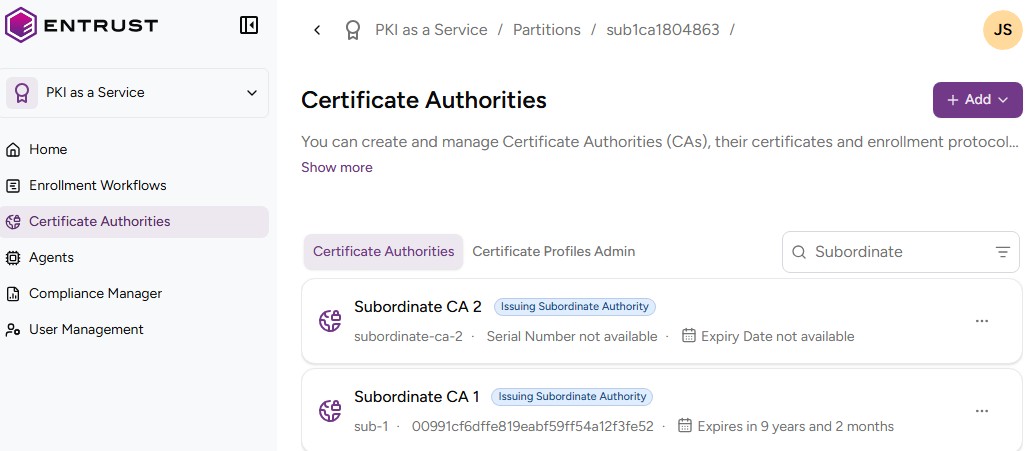
Click Certificate Authorities in the sidebar.
-
In the CA grid, select the name of the intermediate or issuing CA.
-
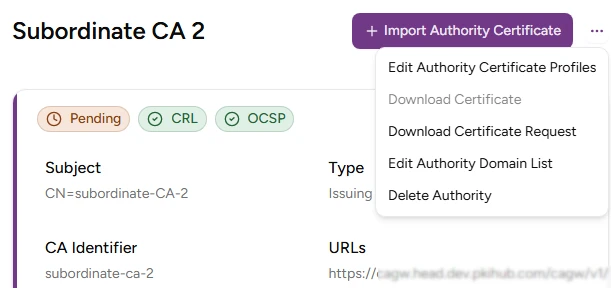
Click the three dots ("…") at the top-right of the page.
-
Select Download Certificate Request to download the Certificate Signing Request (CSR) generated for the subordinate CA.
-
Issue the subordinate CA certificate by signing the downloaded CSR with the private key of the external root CA. Make sure this certificate meets the RFC5280 requirements – for example:
- The certificate includes the Basic Constraints extension with the
caboolean set toTRUE. - The certificate includes the Key Usage extension with the
keyCertSignbit set. - The certificate includes other enabled bits, such as
cRLSignfor signing Certificate Revocation Lists (CRLs).
- The certificate includes the Basic Constraints extension with the
-
Select Import Issuing Certificate Authority to upload the subordinate CA certificate.