Importing an external root authority
See below for how to import a root certificate authority that has been created outside PKIaaS.
To import an external root CA:
-
Follow the steps described in Accessing your partitions to log into the PKIaaS interface as a user with any of these roles:
-
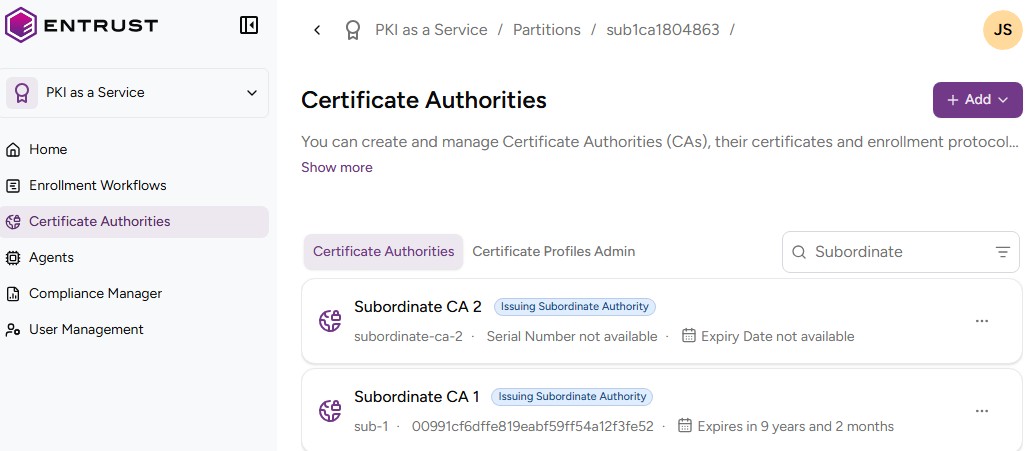
Click Certificate Authorities in the sidebar.
-
Click Add and select Certificate Authority.
-
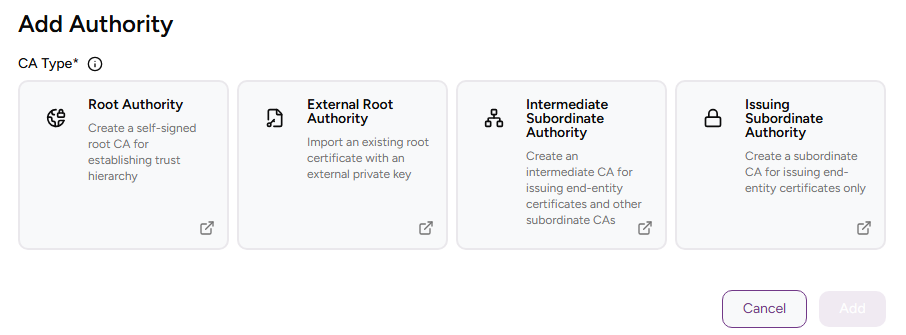
Select External Root Authority.
-
Click Add and complete the following values.
-
Click Create.
-
Check the details of the created CA — for example, the Serial Number of the Certificate Signing Certificate.
CA Identifier
Write a unique identifier for the new CA in your PKI hierarchy. This identifier:
- Must contain 2-18 characters
- Can only include lowercase letters, numbers, hyphens (’-’), and underscores (’_')
ℹ After deleting a CA, wait 24 hours before creating a CA with the same identifier.
Friendly Name
Write a descriptive name for the CA in your PKIaaS partition.
Root CA Certificate
Click Choose File amd select the file containing the Certificate Signing Certificate of the external CA.