Updating an allowed SANs list
See below for updating an allowed SANs list.
To update an allowed SANs list:
-
Follow the steps described in Accessing your partitions to log into the PKIaaS interface as a user with any of these roles:
-
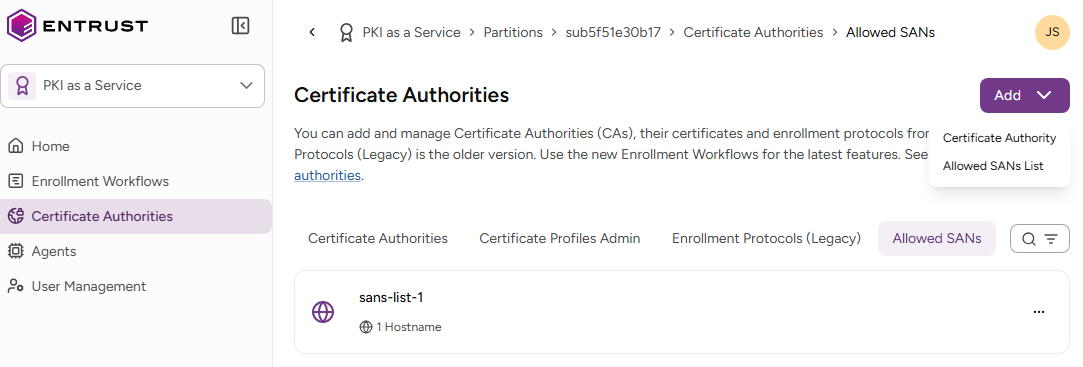
Click Certificate Authorities in the sidebar and select the Allowed SANs tab.
-
Click the three dots (…) to the right of a list and select Modify Allowed SANs Lists.
-
Update the following list settings.
-
Click Modify.
Hostnames
The DNS hostnames allowed by the list. For each hostname, select the corresponding match.
| Match | Pattern | Matches |
|---|---|---|
| Exact match | example.com | example.com |
| Exact match and subdomains | example.com, *.example.com | example.com |
| www.example.com | ||
| api.example.com | ||
| sub.api.example.com | ||
| Match subdomains only | *.example.com | www.example.com |
| api.example.com | ||
| sub.api.example.com |
Networks
The allowed IPv4 and IPv6 network ranges, in CIDR (Classless Inter-Domain Routing) notation.
<IP address>/<prefix length>
See below for sample values.
| Network | Allowed IPs |
|---|---|
| 192.168.1.0/24 | IPs from 192.168.1.0 to 192.168.1.255 |
| 10.0.0.5/32 | A single IP address |
| 2001:db8::/32 | An IPv6 network |