Checking your subscriptions
Log into the PKIaaS Supervisor interface to browse the details of your purchased subscriptions.
ℹ As explained in Definitions, a subscription is a prepaid inventory of PKI products purchased by the customer.
To browse subscriptions:
-
Open the https://super.pkiaas.entrust.com URL of the supervisor interface. Supported browsers are:
- Apple Safari
- Google Chrome
- Mozilla Firefox
-
Authenticate using your credentials.
-
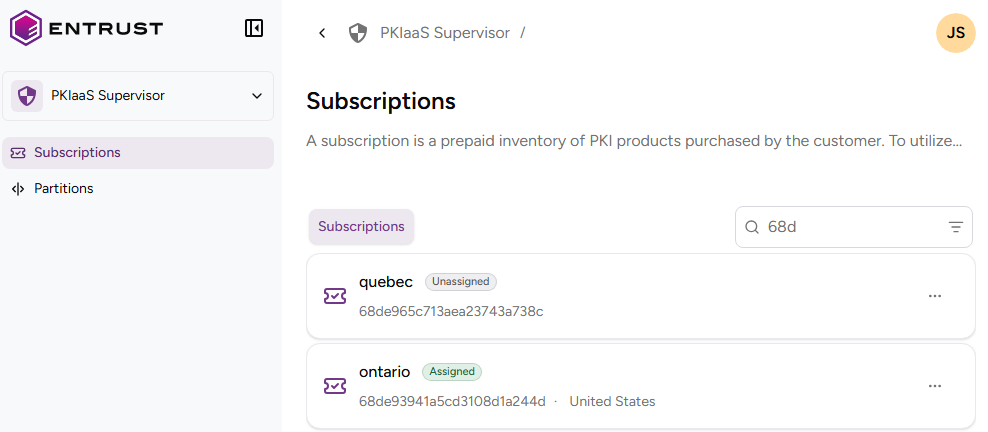
Click Subscriptions in the sidebar.
-
Click the name of a subscription to inspect the following subscription details.
Subscription Identifier
The internal identifier of the subscription.
Status
The subscription status:
- Assigned, if the subscription has been assigned to a partition as explained in Assigning subscriptions to partitions.
- Unassigned otherwise.
Region
The region selected when assigning the subscription to a partition.
ℹ See Definitions for considerations on selecting a region.
URL
The URL for managing the CAs and certificates of the partition as explained in Accessing your partitions.
Inventory
The PKIaaS Certificates section displays the number of subscription certificates in <issued>/<purchased> format. Where:
<purchased>indicates the maximum number of certificates allowed for your subscription.<issued>indicates the number of certificates already issued.
ℹ This inventory does not include the certificate signing certificates issued when creating a certificate authority.
The PKIaaS CA (Root or Issuing) section displays the number of certificate authorities in <active>/<purchased> format. Where:
<purchased>indicates the maximum number of certificate authorities allowed for your subscription.<active>indicates the number of active certificate authorities.
⚠ After Deleting a CA, it takes 24 hours for the CA to be removed from the total number of active CAs.