Changing the certificate status
Follow the steps below to change the validity status of a certificate.
To change the validity status of a certificate:
-
Follow Accessing your instances to log in to the PKIaaS user interface using an account with one of the following roles:
-
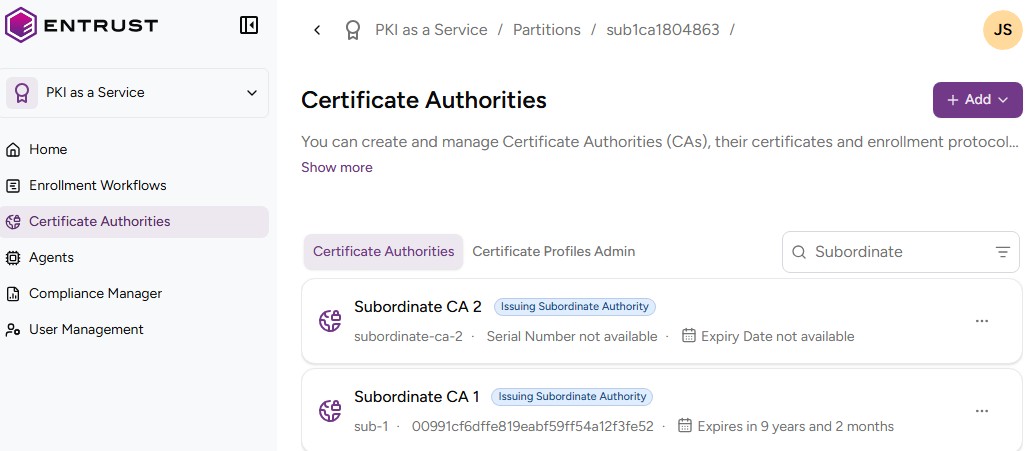
Click Certificate Authorities in the sidebar.
-
In the Certificate Authorities tab, select the certificate authority that issued the certificate.
-
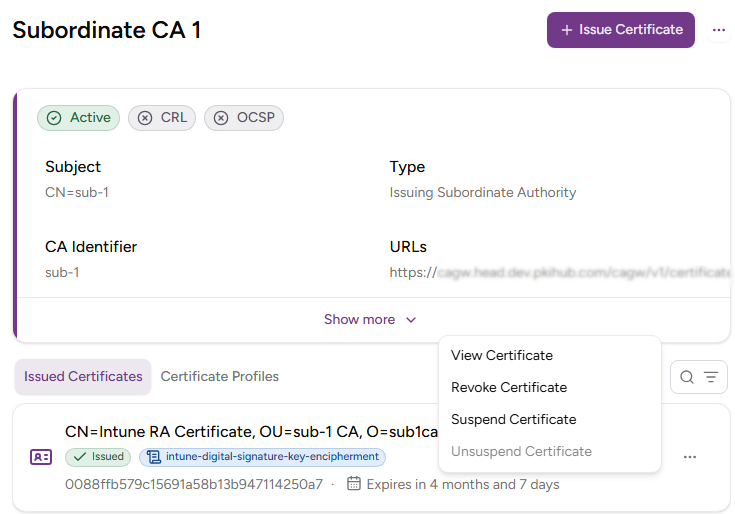
Select the three dots (…) to the right of the certificate.
-
Select one of the following options.
See Browsing certificates for a reference of the certificate details.
Revoke Certificate
Select this option to invalidate the digital certificate before its expiry date. The table below shows the supported Revocation Reason values.
| Revocation reason | Description |
|---|---|
| Unspecified | Unknown revocation reason. |
| Key Compromise | The private key associated with the certificate became exposed, so the system should revoke the certificate to prevent unauthorized use. |
| CA Compromise | If the certificate authority key is exposed, revoking all issued certificates mitigates risk. |
| Affiliation Changed | The certificate holder no longer maintains affiliation with the organization that requested the certificate. |
| Superseded | A newer certificate has replaced the certificate. |
| Cessation of Operation | The entity or service associated with the certificate no longer operates. |
| Privilege Withdrawn | The privileges granted by the certificate are no longer in effect. |
| AA Compromise | A compromise affected the entity responsible for issuing or managing attributes associated with the certificate. |
Suspend Certificate
Select this option to temporarily disable the digital certificate for a specified period.
Unsuspend Certificate
Select this option to reverse the suspension of a certificate, making it valid again for use.