Browsing logs
Browse the following logs on the agent prompt.
ℹ The agent does not currently support SIEM integration.
Browsing agent startup logs
The Agent tab of the agent prompt displays information on each startup step.
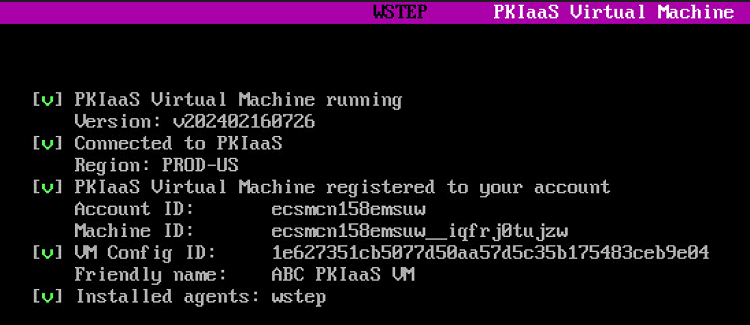
Press the space bar to display more detailed logs.

See the following table for a description of each step.
| Step | Step information | Step completion |
|---|---|---|
| Agent Running | The version of the agent | When the machine is running |
| Connected to Entrust PKIaaS | The region hosting the Entrust PKIaaS services. | When the machine is running |
| Entrust PKIaaS Gateway registered to your account | A registration confirmation message and details on the registered machine | After Registering an agent |
| Node ID | The internal Entrust PKIaaS identifier of the agent | After Registering an agent |
| Installed agents | The “WSTEP” name of the installed agent. | After Installing an agent |
For each step, the prompt displays the following status symbols.
| Symbol | Step status |
|---|---|
| [ ] | Not yet started |
| [\] | In progress |
| [v] | Completed |
| [x] | Failed |
Browsing WSTEP enrollment logs
When completing the startup process, press the tab key to switch to the WSTEP tab and browse logs on the WSTEP agent.
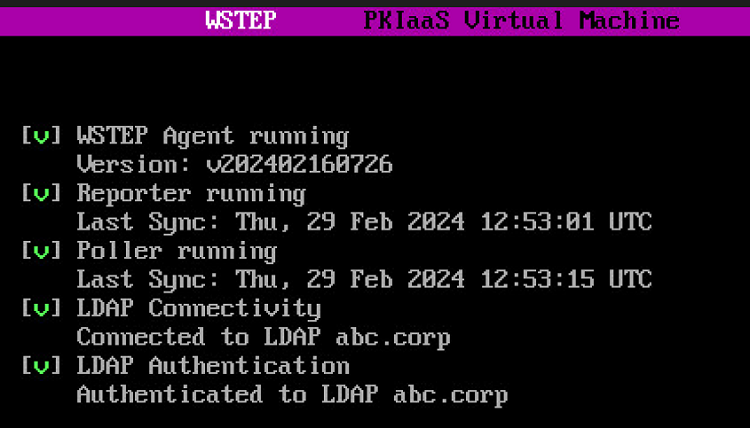
Press the space bar to display more detailed logs.
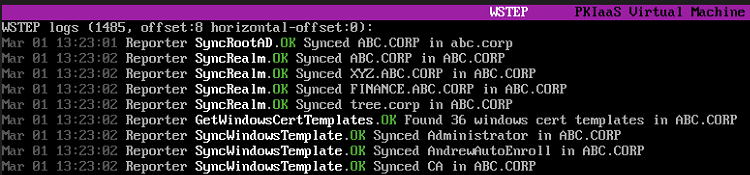
The displayed WSTEP enrollment logs:
- Do not contain any sensitive information.
- Are stored alongside the WSTEP service in the cloud for troubleshooting purposes.
- Cannot be manually exported.