Creating Intune profiles for iOS and iPadOS in Azure
Create the following profiles to enroll iOS and iPadOS devices with Intune.
- A root CA profile
- An issuing CA profile
- An SCEP profile
To create an iOS or iPadOS profile for Intune:
-
Log in to https://endpoint.microsoft.com as a user with administrative privileges.
-
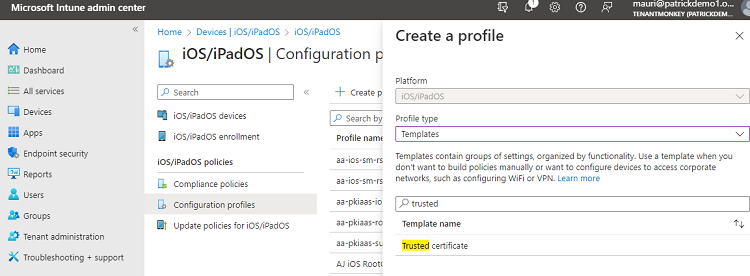
Go to Devices > iOS/iPadOS > Configuration profiles.
-
Click Create profile.
-
Configure the settings described in the following sections.
Create a profile
On the Create a profile dialog, select the following fields for the SCEP profile.
| Setting | Root CA profile | Issuing CA profile | SCEP profile |
|---|---|---|---|
| Platform | iOS/iPadOS | iOS/iPadOS | iOS/iPadOS |
| Profile type | Templates | Templates | Templates |
| Template name | Trusted certificate | Trusted certificate | SCEP certificate |
Configuration settings
When creating root or issuing CA profiles, configure the following settings on the Configuration settings page.
| Setting | Root CA profile | Issuing CA profile |
|---|---|---|
| Certificate file | The root certificate authority certificate | The issuing certificate authority certificate |
ℹ See Downloading a CA certificate to download CA certificates.
When creating an SCEP profile, configure the following settings on the Configuration settings page.
| Setting | Value |
|---|---|
| Certificate type | Select User |
| Subject name format | The syntax of the certificate subject names. This field supports the variables described in https://learn.microsoft.com/en-us/mem/intune/protect/certificates-profile-scep |
| Subject alternative name | The value of each attribute in the certificate subject alternative name. Optional. |
| Certificate validity period | The validity period of the certificates. |
| Key usage | The key usage of the enrolled certificates. |
| Key size (bits) | Select 2048 or 4096 (Entrust PKIaaS does not support key sizes below 2048). |
| Hash algorithm | Select SHA-2. |
| Root certificate | Select the root CA profile. |
| Extended key usage | Select Client Authentication. |
| SCEP Server URLs | Paste one of the URLs obtained when Configuring Intune in PKIaaS. |
Assignments
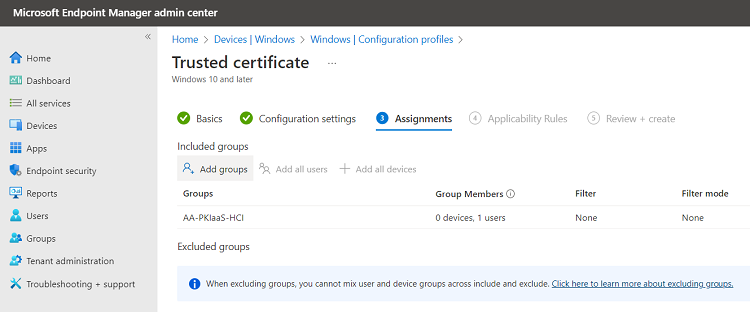
On the Assignments page, select the user group of the Intune-enrolled devices.
Review and create
On the Review + create page, check the settings of the new profile and click Create to confirm the profile creation.