Approving and managing eForm TLS entities
See below for approving and managing eForm TLS entities previously approved, as explained in Requesting eForm TLS entities.
To manage eForm TLS entities:
-
Follow the steps described in Accessing your partitions to log into the PKIaaS interface as a user with the Owners role.
-
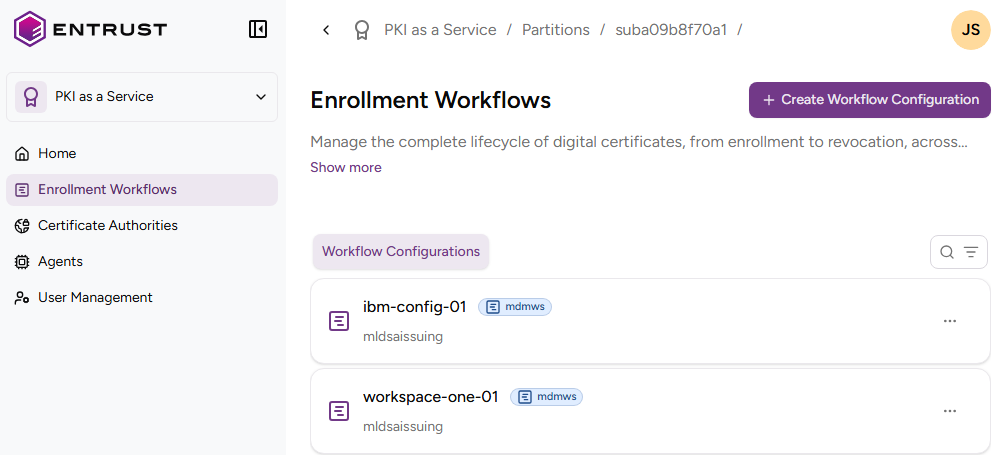
Click Enrollment Workflows in the sidebar.
-
Click on an eForm workflow configuration.
-
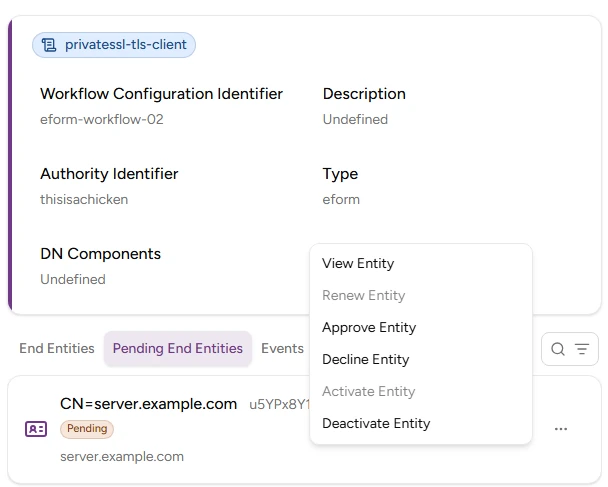
In the workflow details page, select the Pending Entities tab.
-
Click the three dots ("…") to the right of the entity and select:
- Renew Entity to renew the last issued certificate of the entity.
- Approve Entity approve the entity and issue the first TLS certificate.
- Decline Entity to decline an entity and the corresponding TLS certificate request.
- Activate Entity to activate a previously deactivated entity.
- Deactivate Entity to deactivate an entity. Inactive entities do not support renewing the TLS certificate.