Planning your WSTEP deployment
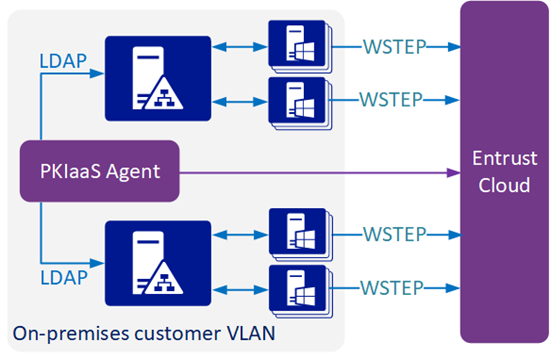
WSTEP integration requires installing an agent virtual machine on-premises in the customer’s LAN. Once installed, this virtual machine:
- Performs LDAPS queries against the Domain Controllers in an Active Directory forest.
- Establishes an outbound connection with the Entrust Cloud.
The Windows devices send WSTEP requests directly to the Entrust PKIaaS service hosted in the Entrust cloud. See below for the main integration scenarios.
- Deploying a single agent for multiple Active Directory forests
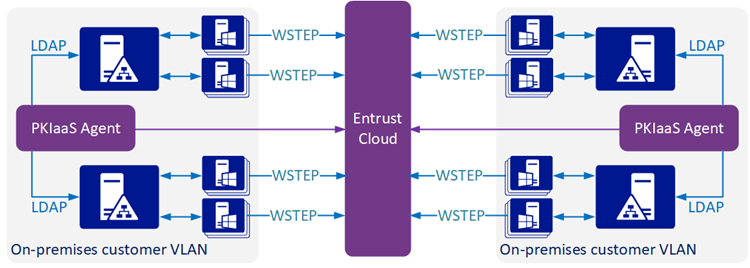
- Deploying multiple agents for Active Directory forests in different networks
Deploying a single agent for multiple Active Directory forests
A single agent can handle any number of Active Directory forests, provided it can connect with each one.
Deploying multiple agents for Active Directory forests in different networks
As illustrated by the diagram below, multiple agents are required when a single agent cannot communicate with all forests.
In any case, configuring multiple Active Directory forests:
- Requires preparing the domain controllers of each Windows forest as explained in this document.
- Requires adding the root domain of each Windows Forest to the Entrust PKIaaS portal.
- Does not require two-way transitive trusts.