Preparing the command-line interface
To run AWS commands on your machine, download and install the AWS CLI as explained in:
https://docs.aws.amazon.com/cli/latest/userguide/getting-started-install.html
Alternatively, you can use the ShellCloud provided by the AWS console. This option requires uploading the configuration file as explained below.
To upload the AMI import configuration file:
-
Type “shell” in the AWS console search box.
-
Select CloudShell in the search results to display the online AWS shell.
-
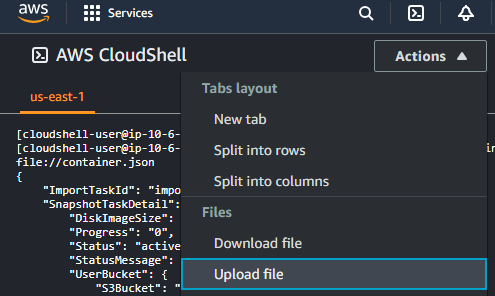
In the options menu, select Actions > Upload file.
-
Select the
containers.jsonfile described in Creating an AMI import configuration file. -
Click Upload.