Issuing certificates in PKCS #12
Follow the steps below to generate a PKCS #12 file containing:
- A key pair generated by Entrust PKIaaS.
- The issued certificate.
- The CA certificate chain of the issued certificate.
To issue a PKCS #12:
-
Follow Accessing your instances to log in to the PKIaaS user interface using an account with one of the following roles:
-
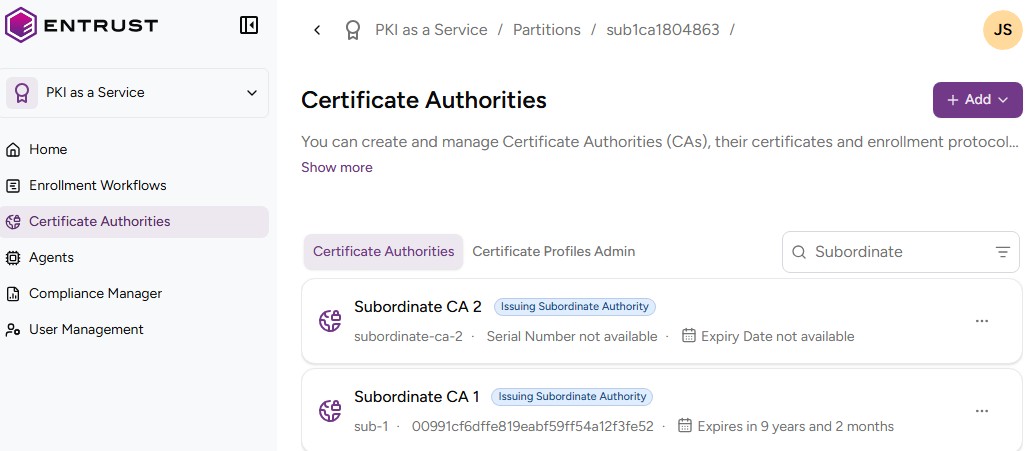
Click Certificate Authorities in the sidebar.
-
In the Certificate Authorities tab, select the three dots (…) to the right of the certificate authority that will issue the certificate.
PKIaaS does not provide root certificate authorities with profiles for issuing PKCS #12 files. -
Select Issue Certificate.
-
Click Certificate with Server-side Generated Key (PKCS #12).
-
Complete the following values.
-
Click Issue.
-
Check the certificate details and click Download your PKCS #12 to download the issued PKCS #12 file.
Entrust PKIaaS does not store the generated key pair in any way. Once you leave this page, you cannot download the PKCS #12 file.
Certificate profile
Select one of the Subscriber certificate profiles for the certificate authority to issue this certificate.
PKCS #12 Password
Type and confirm a password to protect the contents of the PKCS #12 file.
Subject
Enter a value for each RFC 5280 attribute in the certificate subject’s Distinguished Name (DN).
| Field | Mandatory |
|---|---|
| Common Name | ✔ |
| Organization | ❌ |
| Organizational Unit | ❌ |
| State/Province | ❌ |
| Locality Name | ❌ |
| Domain Component | ❌ |
| Country | ❌ |
Alternatively, you can:
- Toggle the Advanced Subject switch.
- Type a Distinguished Name (DN) that includes additional attributes.
For example, when the certificate subject represents a corporate employee:
CN=John Doe, OU=Sales, O=Example Corp, L=San Francisco, ST=California, C=US
When the certificate subject represents a corporate domain:
CN=server1.example.com, OU=IT, O=Example Corp, L=Chicago, ST=Illinois, C=US
Subject Alternative Names
Add optional Subject Alternative Names (SANs) for the certificate subject. Typically, SANs extend the domain names or IP addresses set in the Subject field of a TLS certificate. For example:
| SAN type | SAN example value |
|---|---|
| DNS Name | example.com |
| DNS Name | www.example.com |
| DNS Name | example.net |
| DNS Name | mail.example.com |
| DNS Name | support.example.com |
| DNS Name | example2.com |
| IPv4 Address | 93.184.216.34 |
| IPv6 Address | 2606:2800:220:1:248:1893:25c8:1946 |
Custom Fields
Enter values for the optional fields described in Managing custom fields.